 InvoiceCraft
Warranty tracking for contractors
You already invoiced the job. Now see what it could still cost you.
InvoiceCraft attaches your workmanship warranty to every invoice you mark paid, computes the coverage dates, estimates the labor and parts still under cover from the line items you already typed, and files every callback against the job that caused it. There is no separate tracker to fill in.
The promise is easy. The arithmetic is not.
Most trades give a warranty whether or not anyone writes it down: a year on labor, ninety days on parts, two years on a roof. Six months on you have forty paid jobs, some still your problem, and no way to see which ones without opening every invoice. So "how much work am I still on the hook for" gets answered with a shrug, and labor gets priced as if callbacks were free. They are not. They are just late.
How it works
- A paid invoice attaches the terms. Set your warranty once in Settings: labor days, parts days, and the exclusions in your own words. When an invoice is marked paid, that template is snapshotted onto the job and the coverage windows run from the payment date, or from a completion date if you set one. Changing your default later never rewrites a warranty already issued.
- The exposure estimate comes from the line items. Labor and parts lines are totalled separately, hours as hours and dollars as dollars. Enter an internal labor cost per hour and a parts cost percentage and the estimate uses those; leave them blank and it uses the billed amounts and says so. Lines it cannot classify get their own bucket rather than being guessed into the total, with one click to label them for good.
- Callbacks are logged from the invoice. Open the original job and record what went wrong, the date, and the decision: covered, goodwill, rejected, or billable. Billable creates a new invoice with the client already filled in. Parts receipts attach through expenses and stay linked to the claim.
What the customer sees
Two things, both on by default once you enable the feature, and both switchable off.
The first is a one-line warranty statement under the terms on every invoice, estimate, proposal, and receipt, and on the online page you send the customer: the labor term, the parts term, and the dates the cover runs between. The second is a Warranty Terms page, free text you write once, appended as its own page to the invoice PDF. Between them the warranty stops being something you said on the driveway and becomes something the customer can point at, which is usually the difference between a callback and a dispute. It earns its keep before any claim is filed: a written warranty reads as a business that expects to still be here next year.
Reports: coverage, expirations, and what callbacks really cost
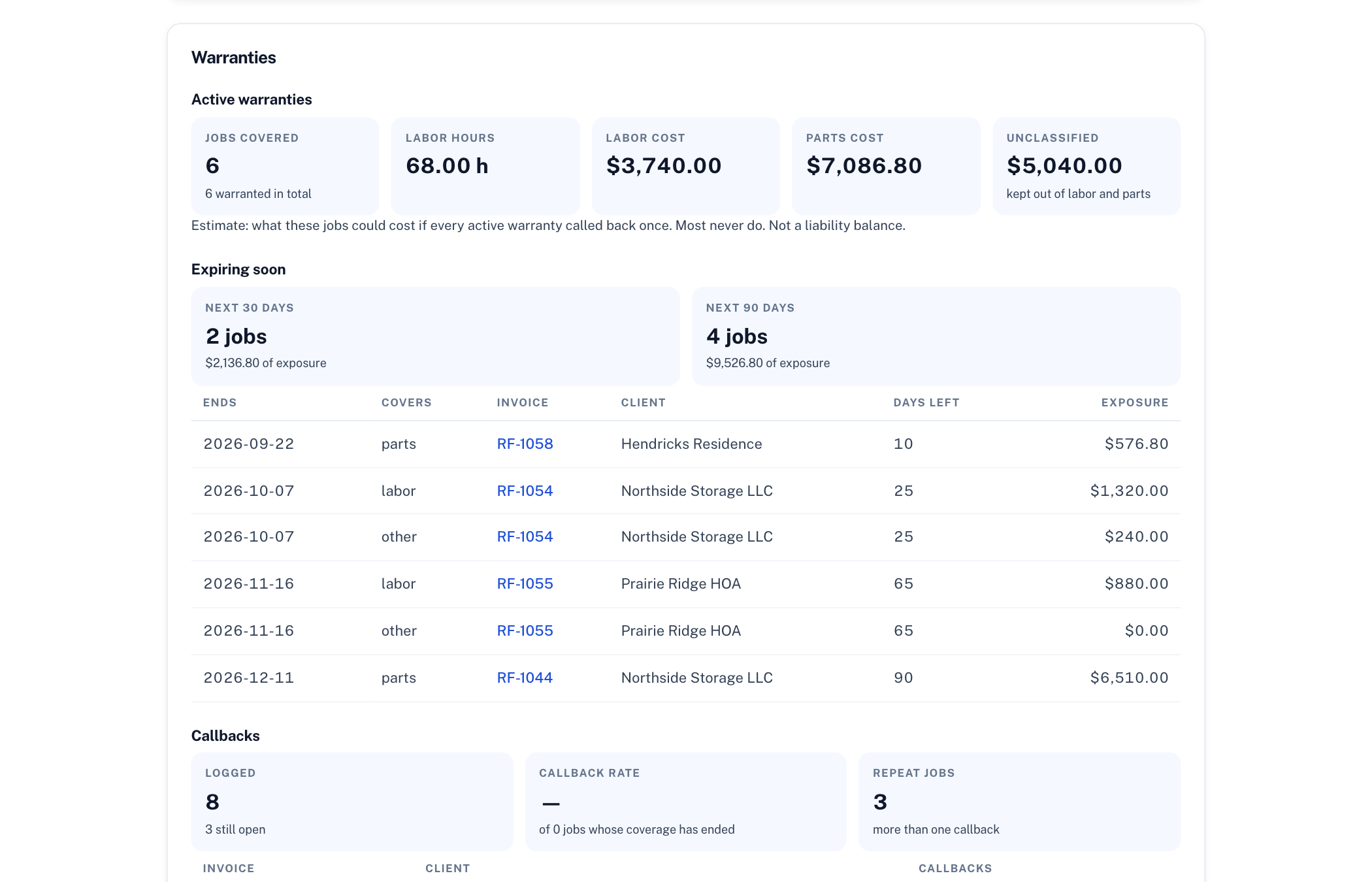
Reports shows how many jobs are under cover and what the labor hours, labor cost, and parts cost add up to; what runs out in the next 30 and 90 days; your callback rate, meaning jobs with at least one covered claim as a share of warranted jobs whose coverage has ended; and what callbacks actually cost in labor, parts, and other spend, net of anything you recovered, as a percentage of the revenue on those same invoices. That last number is the one that changes how you bid.
Warranties and claims export to CSV. Turn on the digest and you get an email with coverage ending in the next seven days and any claim open more than fourteen.
Extended coverage as a bid tactic
"Two years on labor for this one" wins jobs against a cheaper number, and on the day you say it, it costs nothing. Set the longer term on the estimate or proposal before you send it and it travels with the document: it prints in the terms the customer accepts, carries through when the proposal becomes an invoice, and is what the paid invoice snapshots. Price the extension as an optional line item and the customer can tick it themselves on the proposal page. Only the owner can change coverage, because a changed warranty is a changed liability; crew members log callbacks and see dates, and you decide whether they see the exposure figures.
Starting points by trade
Pick your trade and InvoiceCraft fills in these defaults. They are a starting point, not legal advice: change the days, rewrite the exclusions, and check them against what you actually promise on site.
| Trade | Labor | Parts and materials |
|---|---|---|
| HVAC | 1 year | 90 days (manufacturer terms apply separately) |
| Plumbing | 1 year | 90 days |
| Electrical | 1 year | 90 days |
| Roofing | 2 years | 1 year (material warranty from the manufacturer) |
| Landscaping | 1 year | 30 days on plant material with proper watering |
| Painting | 1 year on applied coatings | None |
| Handyman | 180 days | 30 days |
Cleaning, pressure washing, lawn care, tree removal, and auto repair have their own defaults; anything else starts at 1 year labor and 90 days parts.
What it costs
Warranty tracking is included in Pro at $9 a month and Team at $15 a month for up to five people. No add-on, no per-job charge, nothing extra to enter beyond the one-time setup. Wave, Invoice Simple, and Zoho Invoice do not track workmanship warranties at all; the field-service suites that do start around $40 a month and bring a scheduling module you did not ask for. Compare the rest: vs Wave, vs Invoice Simple, vs Zoho Invoice.
Frequently asked questions
What counts as warranty exposure?
The labor and parts on jobs whose coverage window is still open. InvoiceCraft totals the labor lines and the parts lines from each paid invoice, keeps hours and dollars separate, and uses your internal labor rate and parts cost percentage when you have entered them, or the billed amounts when you have not. Lines that are neither labor nor parts are shown as an unclassified bucket rather than folded in.
Is the exposure figure a liability on my books?
No. It is an estimate of what the work would cost if every active warranty called back once and the job were redone in full, which almost never happens. It has no probability model behind it and it is not an accounting figure. Use it to see how much unpaid work you are carrying and to price labor and parts accordingly, and talk to your accountant about anything that belongs on a balance sheet.
Can I change the warranty terms per job?
Yes. Every invoice, estimate, and proposal has a warranty panel where the owner can change the labor and parts days, rewrite the exclusions, adjust the exposure figures, or mark a job as carrying no warranty at all. Terms set on an estimate or proposal carry through to the invoice it becomes, so extended coverage you promise in a bid is what the paid job records. Edits apply to that document only and never touch warranties already issued.
What do customers see?
A one-line warranty statement under the terms on invoices, estimates, proposals, and receipts, on the online page you send them, and in the email, plus an optional Warranty Terms page appended to the invoice PDF in your own wording. Both are on by default once you enable the feature and both can be switched off. Customers never see your exposure estimate, your internal labor rate, or your callback history.
Does warranty tracking cost extra?
No. It is part of Pro at $9 a month or $90 a year for one login, and Team at $15 a month or $150 a year for up to five people on one business. Both plans include every feature; there is no add-on and no per-job fee. The 14-day trial covers it, with no card required.
Related
Proposals · Estimates · E-signature · Pricing · 2026 Trade Pricing Report